Bioverse
A US telehealth platform selling prescription longevity care needed a marketing site that could carry eleven treatment categories, and a patient portal Webflow was never meant to run.
- Client
- Bioverse, Inc.
- Industry
- Telehealth, prescription longevity care
- Timeline
- 8 weeks, launched Aug 2025
- Scope
- Webflow marketing site with all product data in the CMS, plus a custom React patient app
- My role
- Webflow development and CMS architecture, the React login and intake application, the handoff between the two, and technical SEO and AEO
The challenge
Bioverse prescribes and ships real medication. Semaglutide and tirzepatide for weight loss, NAD+ and B12 injections, glutathione, metformin, telmisartan, finasteride, tretinoin. Every one of them is a prescription, reviewed by a US-licensed provider, dispensed by a regulated pharmacy and delivered to a patient's door.
That makes it two products wearing one brand. The public site has to explain eleven categories of treatment to someone who has never heard of NAD+, and stay legible under FDA and telehealth advertising rules. The patient side has to take medical history, run an eligibility check, handle prescriptions, subscriptions and provider messaging.
Webflow is very good at the first job and completely wrong for the second. Protected health information cannot live in a CMS. So the real question was never which platform, it was where the line between them sits, and how a patient crosses it without noticing.
What the brief had to deliver
- Eleven treatment categories, navigable on a phone in one thumb
- A marketing site the team can extend without a developer
- A patient portal with authentication, orders and messaging
- No PHI anywhere near the CMS
- Compliance copy present without killing the conversion path
- Product pages that rank for generic drug names
Design approach
Most telehealth sites look like either a pharmacy or a supplement brand. Bioverse had to look like neither: clinical enough to trust with a prescription, warm enough that a first-time visitor does not close the tab.
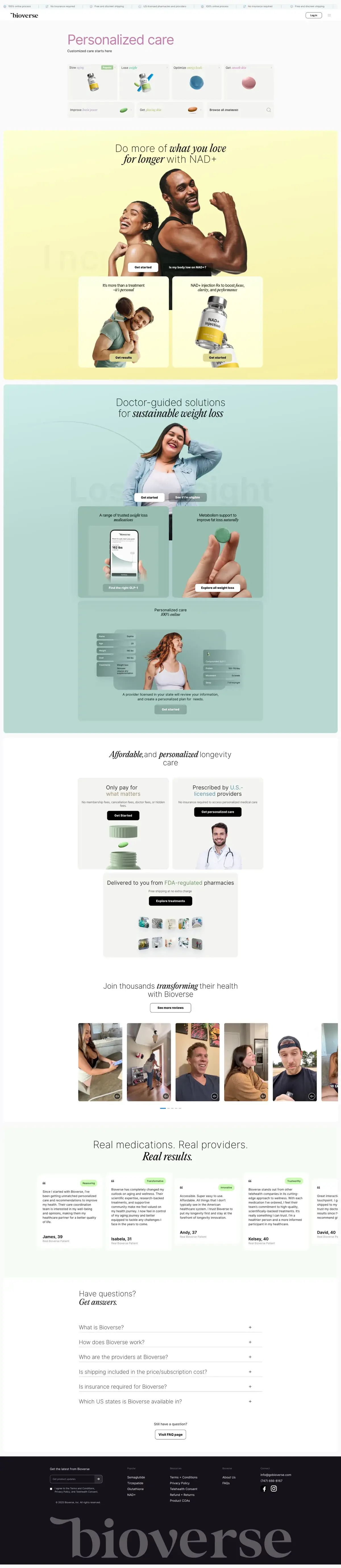
The homepage opens on a rotating headline that cycles the word before care — science-backed, longevity, personalized, 100% online, affordable. One sentence, five promises, no scrolling required. Under it sits a treatment picker written in the patient's language rather than the pharmacy's: slow aging, lose weight, optimize energy levels, get smooth skin.
Each category then owns a colour. NAD+ runs on soft yellow, weight loss on sage green, longevity on bone. The section changes behind you as you scroll, so the page reads as a set of rooms rather than one long scroll, and the product photography carries the section rather than competing with it.
Trust is placed before the ask, not after it. A ticker of the four things people worry about — online process, no insurance, discreet shipping, licensed pharmacies — runs above the logo, and every conversion block repeats the relevant one next to its button.
What the first screen carries
- Trust ticker100% online process, no insurance required, free and discreet shipping, US-licensed pharmacies and providers
- Rotating headlineFive variations of the same promise, cycled on a timer
- Treatment pickerGoal-led entry points that deep-link straight into intake
- Single account actionOne log-in control, because everything else is a first-time path
The Webflow build
The hardest component on the site is the navigation. Eleven categories, each holding two to six prescription treatments, plus a popular-treatments shortcut and the brand pages. On desktop that is a mega-menu with a panel per category. On mobile a mega-menu is unusable.
So mobile gets a different interaction entirely, built from the same content: a drill-down. Tap a category, the panel slides in with its own icon, its treatment list and a back arrow. It behaves like an app rather than a website, which matters because a large share of this traffic arrives from a phone.
Everything that repeats is a component — category panel, treatment card, trust ticker, testimonial slide, FAQ row, footer. Adding a twelfth category is a content job, not a build job.
On weight: imagery is served as AVIF throughout, testimonial video runs from Vimeo rather than self-hosted files so the page never carries the video weight, and the sliders are lightweight rather than a full carousel framework.
Components built once
- NavigationDesktop mega-menu and a mobile drill-down, sharing one content source
- Treatment cardIcon, name,
Rxflag and a deep link into intake - Trust tickerLooping marquee, repeated in the conversion blocks
- Testimonial sliderVideo slides on Vimeo, quote slides with a one-word verdict
- FAQ accordionReal text on the page, marked up as FAQPage
CMS and treatment pages
Every product on the site is CMS data, not a hand-built page: every treatment, every dose option, every subscription cadence and every category is an item in a Webflow CMS designed for it. Each treatment publishes to /product/<slug> — semaglutide, tirzepatide, nad-injection, glutathione-injection, metformin — and carries its own category reference, dosage options, subscription cadence and the intake URL it should hand off to.
That reference field is what makes the navigation self-maintaining. Tagging a new treatment into a category places it in the mega-menu, the mobile drill-down and the category listing at the same time. Nobody opens the Designer to launch a product.
Alongside it sit the blog and the compliance pages: terms, privacy policy, telehealth consent, refunds and returns, and product COAs. Legal content changes on its own schedule and is kept out of the marketing collections so an update never touches a product page.
Collections
- TreatmentsSlug, category reference, dosage and cadence options, intake handoff URL
- CategoriesIcon, colour and ordering; drives both navigation patterns
- BlogLongevity and treatment education, feeding the resources hub
- ComplianceTerms, privacy, telehealth consent, refunds, COAs — versioned separately
The custom React app
Everything a logged-in patient does happens in a React application on app.gobioverse.com, built from scratch. Account creation and login, the medical intake questionnaire, eligibility, prescription status, subscription management and provider messaging all live there. None of it touches Webflow, which is what keeps protected health information out of the CMS entirely.
The interesting part is the seam. A patient who taps Semaglutide Rx in the mega-menu should not land on a generic sign-up form and start over — they have already told you what they want. So every treatment link carries its selection in the URL, and the React app reads it on first paint.
A link like /intake/middlelayer/nad-injection?st=one_time&pvt=1000mg/5ml vial opens intake with the product, the vial size and the one-time cadence already chosen. The patient starts at the medical questions, not at a product menu. Two intake routes exist behind this — a guided middlelayer flow for treatments that need education first, and a direct prescriptions flow for patients who already know what they are asking for.
From the patient's side there is no seam at all. The React app inherits the Webflow design tokens, so the type, the colour and the components match, and the transition from marketing site to patient portal reads as one product.
handoffparams
- pvtproduct variant · 1000mg/5ml vial
- stsubscription term · monthly | quarterly | one_time
- pvnvariant index within the product
- sdsource and discount context
- routemiddlelayer → guided intake
- routeprescriptions → direct intake
Compliance and trust
Telehealth advertising is constrained in ways ordinary e-commerce is not. Prescription treatments cannot be sold like consumer goods, brand-name drugs have to be marked correctly, and the platform can only serve states where its providers hold a licence.
So the constraints are built into the components rather than bolted on. Every treatment carries an Rx flag by name. Brand names — Ozempic®, Wegovy®, Mounjaro®, Cialis®, Viagra® — always appear with their marks, and generics are named alongside them, which serves both the regulator and the search engine. The FAQ states plainly that the service is for adults 18 and over and lists every state where it operates.
Consent is a page, not a checkbox buried in terms. Telehealth consent, privacy, refunds and returns, and certificates of analysis for compounded products each get a real URL, linked from the footer, and reachable before anyone enters an email address. The LegitScript certification seal sits in the footer where a cautious patient will look for it.
What is on the page by design
- Rx labellingEvery prescription treatment marked at the point it is named
- State availabilityListed in full, in the FAQ, not hidden at checkout
- Provider credentialsBoard-certified physicians, nurse practitioners and physician assistants
- Product COAsCertificates of analysis published for compounded treatments
- LegitScriptCertification seal in the footer of every page
SEO and AEO
Getting found by Google
Search demand in this category is for the drug, not the brand. People search semaglutide, tirzepatide, NAD+ injection — so each treatment gets its own indexable page at a generic-name slug rather than being buried behind an app login. Titles, meta descriptions and Open Graph data come from the CMS item, so a new treatment is publishable without an SEO pass.
The compliance pages help more than they look like they should. Telehealth consent, COAs and a full state list are exactly the trust signals Google looks for on health content, where the bar is set higher than in other categories.
Getting quoted by AI assistants
Health questions are increasingly asked of an assistant before a search engine, and assistants quote pages that answer a question directly and name things consistently.
The FAQ answers are written to be lifted whole: what Bioverse is, how the process works, who the providers are, whether insurance is needed, which states are covered. Each is a complete answer in one paragraph, marked up as FAQPage, and genuinely visible on the page rather than injected as schema only.
Naming is kept consistent everywhere — the same treatment is called the same thing in the navigation, on its product page and in the intake flow, which is what lets an assistant connect them as one entity.
Results
What the architecture delivers, measured against what a single-platform build would have made possible.
Patient data in the CMS
Authentication, medical intake and prescriptions all live in the React app. Webflow never sees a patient record.
Tap from menu to intake
Treatment links carry product, variant and cadence in the URL, so intake opens with the plan already selected.
Categories, one component
Desktop mega-menu and mobile drill-down are generated from the same CMS content. A twelfth category is a content edit.
Indexable treatment pages
Every prescription has a public page at a generic-name slug, rather than sitting behind the app login where search cannot reach it.
States served from one build
Availability is content, not code. Adding a state updates the FAQ, the eligibility copy and the intake gate together.
Teams shipping independently
Marketing publishes treatments and posts in Webflow while the app ships on its own release cycle. Neither blocks the other.
Stack
- Webflow
- Webflow CMS
- Custom JavaScript
- AVIF imagery
- Vimeo
- Figma
- React
- Custom authentication
- Multi-step medical intake
- Subscription management
- Provider messaging
- LegitScript
- Telehealth consent
- Product COAs
- State eligibility gating
More case studies

B2B Rocket
A 7-week Webflow rebuild for an AI sales platform: 34 pages on Client-First, 3 CMS collections, first-party tracking, and 31% more demo bookings.
Need a Webflow site with a custom app behind it?
I build the marketing site in Webflow and the product in code, then make the join invisible — so content stays editable and the app stays yours.